Sabtu, 03 Juni 2023

.tsx to .js

 /**


https://reactnative.dev/docs/environment-setup?guide=native

 * Sample React Native App
 * https://github.com/facebook/react-native
 * npm i -g npx
 * npx react-native run-android
 * @format
 */
import * as React from 'react';
import {
  SafeAreaView,
  ScrollView,
  StatusBar,
  StyleSheet,
  Text,
  View,
  TextInput,Button, Alert
} from 'react-native';

import {
  Colors,
  DebugInstructions,
  Header,
  LearnMoreLinks,
  ReloadInstructions,
} from 'react-native';    


 //const App: () => Node = () => {
  const App=() => {  
 const [bil1, setBil1] = React.useState(null);
  const [bil2, setBil2] = React.useState(null);
  const [hasil, setHasil] = React.useState(null);
  const [hasil2, setHasil2] = React.useState(null);

  const TAMBAH = () => {
    let val = (Number(bil1) + Number(bil2)).toFixed(1);
    let val2='Proses Tambah Antara '+bil1+' dengan '+bil2 +' menghasilkan bilangan '+val;
    Alert.alert(val2);
    setHasil(val);
    setHasil2(val2);
  };
  const KURANG = () => {
    let val = (Number(bil1) - Number(bil2)).toFixed(1);
    let val2='Proses Kurang Antara '+bil1+' dengan '+bil2 +' menghasilkan bilangan '+val;
    Alert.alert(val2);
    setHasil(val);
    setHasil2(val2);
  };
  const KALI = () => {
    let val = (Number(bil1) * Number(bil2)).toFixed(1);
    let val2='Proses Kali Antara '+bil1+' dengan '+bil2 +' menghasilkan bilangan '+val;
    Alert.alert(val2);
    setHasil(val);
    setHasil2(val2);
  };
  const BAGI = () => {
    let val = (Number(bil1) / Number(bil2)).toFixed(1);
    let val2='Proses Bagi Antara '+bil1+' dengan '+bil2 +' menghasilkan bilangan '+val;
    Alert.alert(val2);
    setHasil(val);
    setHasil2(val2);
  };
  const PANGKAT = () => {
    let val = (Math.pow(Number(bil1), Number(bil2))).toFixed(1);
    let val2='Proses Pangkat Antara '+bil1+' dengan '+bil2 +' menghasilkan bilangan '+val;
    Alert.alert(val2);
    setHasil(val);
    setHasil2(val2);
  };
  const MOD = () => {
    let val = (Number(bil1) % Number(bil2)).toFixed(1);
    let val2='Proses MOD Antara '+bil1+' dengan '+bil2 +' menghasilkan bilangan '+val;
    Alert.alert(val2);
    setHasil(val);
    setHasil2(val2);
  };
  const SIN = () => {
    let deg= (Number(bil1) + Number(bil2));
    //let bil = rad * 180 / Math.PI;
    let bil = (deg * Math.PI) / 180.0;

    let val = (Math.sin(bil)).toFixed(1);
    let val2='Proses SINUS '+deg+' menghasilkan bilangan '+val;
    Alert.alert(val2);
    setHasil(val);
    setHasil2(val2);
  };
  const CLEAR = () => {
    setBil1("");
    setBil2("");
    setHasil("");
  };

 return (
 <View>  
      <TextInput
          style={styles.input}
          onChangeText={setBil1}
          value={bil1}
          placeholder="Bilangan 1"
          keyboardType="decimal-pad"
        />
    <TextInput
          style={styles.input}
          onChangeText={setBil2}
          value={bil2}
          placeholder="Bilangan 2"
          keyboardType="decimal-pad"
        />
         <View style={styles.buttonContainer}>  
          <Button  title="+" onPress={TAMBAH} containerStyle={styles.button}/>
          <Button  title="-" onPress={KURANG} containerStyle={styles.button}/>
          <Button  title="x" onPress={KALI} containerStyle={styles.button}/>
          <Button  title=":" onPress={BAGI} containerStyle={styles.button}/>
          <Button  title="^" onPress={PANGKAT} containerStyle={styles.button}/>
          <Button  title="%" onPress={MOD} containerStyle={styles.button}/>
          <Button  title="$" onPress={SIN} containerStyle={styles.button}/>
      </View>  

          <Text style={styles.title}>
             {hasil2}
          </Text>

    <TextInput
          style={styles.input}
          value={hasil}
          placeholder="Hasil"
        />
     
    <Button title="C L E A R" onPress={CLEAR}></Button>
   
 </View>
  );
}

const styles = StyleSheet.create({
  buttonContainer: {
    height: 60,
    flexDirection: 'row',
    justifyContent: 'center',
    alignItems: 'center',
    backgroundColor: 'red'
  },
  input: {
    height: 40,
    margin: 12,
    borderWidth: 1,
    padding: 10,
  },
  title: {
    textAlign: 'center',
    marginVertical: 8,
  },
  button: {
    flex: 2,
    padding: 12,
    backgroundColor: 'steelblue',
    alignSelf: 'stretch',
    justifyContent: 'center',
  },
});

export default App;

HandlePress React Native

 import { Text, View, StyleSheet, Image, ScrollView, TouchableOpacity, Alert } from "react-native";
import React, { useState, useEffect } from "react";

import AsyncStorage from "@react-native-async-storage/async-storage";
import { useNavigation } from "@react-navigation/native";
import { API, baseURL, Resource } from "../../config/api";

import Ionicons from "@expo/vector-icons/Ionicons";
const DetailMenu = ({ route }) => {
  // Data
  const navigation = useNavigation();

  // State
  const [count, setCount] = useState(1);
  const [total, setTotal] = useState(1);
  const [isLoading, setIsLoading] = useState(false);
  const {data}= route.params;
  // Function

  const handlePress = async () => {
    setIsLoading(true);
    let id_pelanggan = await AsyncStorage.getItem("auth");
    let formData = new FormData();
    formData.append("id_pelanggan", id_pelanggan);
    formData.append("id_ukm", data.id_ukm);
    formData.append("id_produk", data.id_produk);
    formData.append("jumlah", count);

    let url = baseURL + "order/order_add.php";
    const config = {
      headers: {
        "Content-Type": "application/json",
      },
    };
    fetch(url, {
      method: "post",
      config,
      body: formData,
    })
      .then((response) => response.json())
      .then((responseJson) => {
        setIsLoading(false);
        console.log(responseJson);
        if (responseJson.sukses === 1) {
          setIsLoading(false);
          Alert.alert("Sukses!", "Ditambahkan ke keranjang.", [{ text: "Ok" }]);
          navigation.navigate("Cart");
        } else {
          setIsLoading(false);
          Alert.alert("Gagal!", "Gagal tambah data.", [{ text: "Ok" }]);
        }
      })
      .catch((err) => {
        setIsLoading(false);
        console.log(err);
        Alert.alert("Gagal!", "Error", [{ text: "Ok" }]);
      });
  };

  const plustCount = () => {
    setCount(count + 1);
  };

  const minusCount = () => {
    setCount(count === 1 ? count - 0 : count - 1);
  };
  return (
    <View style={styles.container}>
      <Image
        source={{
          uri: Resource + "/" + data.gambar1,
        }}
        style={{ width: "100%", height: "40%", marginTop: -40 }}
      />
      <View style={styles.containerInside}>
        <View style={styles.back}>
          <TouchableOpacity onPress={() => handleBack()}></TouchableOpacity>
          <Text style={styles.title}>Detail Produk</Text>
        </View>
        <ScrollView showsVerticalScrollIndicator={false}>
          <View>
            <View style={[styles.count, { flex: 1, flexDirection: "row", justifyContent: "space-between", alignItems: "center" }]}>
              <Text
                style={{
                  fontSize: 32,
                  fontFamily: "Poppins_700Bold",
                  color: "#0B0063",
                }}
              >
                {data ? data.nama_produk : ""}
              </Text>
              <View style={{ flexDirection: "row" }}>
                <TouchableOpacity onPress={() => minusCount()}>
                  <View style={styles.buttonCount}>
                    <Text style={{ fontSize: 18, color: "#0B0063", fontFamily: "Poppins_700Bold", marginBottom: 5 }}>-</Text>
                  </View>
                </TouchableOpacity>
                <Text
                  style={{
                    alignSelf: "center",
                    marginHorizontal: 10,
                    fontSize: 24,
                    fontFamily: "Poppins_700Bold",
                    color: "#0B0063",
                  }}
                >
                  {count}
                </Text>
                <TouchableOpacity onPress={() => plustCount()}>
                  <View style={styles.buttonCount}>
                    <Text style={{ fontSize: 18, color: "#0B0063", fontFamily: "Poppins_700Bold" }}>+</Text>
                  </View>
                </TouchableOpacity>
              </View>
            </View>

            <Text
              numberOfLines={6}
              style={{
                fontSize: 16,
                fontFamily: "Poppins_400Regular",
              }}
            >
              {data ? data.deskripsi : ""}
            </Text>
            <Text
              style={{
                fontSize: 14,
                fontFamily: "Poppins_400Regular",
                fontWeight: "500",
                marginTop: 10,
                color: "black",
              }}
            >
              Jenis :
            </Text>
            <Text style={{ fontFamily: "Poppins_400Regular", fontSize: 14, backgroundColor: "green", borderRadius: 2, paddingHorizontal: 10, color: "#fff" }} numberOfLines={1}>
              {data.jenis}
            </Text>
          </View>

          <View style={{ marginVertical: 20, height: "30%", flexDirection: "row" }}>
            <View style={{ flexDirection: "column", width: "55%" }}>
              <Text
                style={{
                  fontSize: 14,
                  fontFamily: "Poppins_400Regular",
                  fontWeight: "500",
                }}
              >
                Harga :{" "}
              </Text>
              <Text
                style={{
                  fontSize: 16,
                  fontFamily: "Poppins_700Bold",
                  fontWeight: "500",
                  color: "#ab0505",
                }}
              >
                Rp {data ? data.harga : 0}
              </Text>
            </View>

            <View style={{ flexDirection: "column", width: "45%" }}>
              <TouchableOpacity
                onPress={() => handlePress({ data: data })}
                style={{
                  width: "100%",
                  height: 45,
                  marginTop: 10,
                  backgroundColor: "#0B0063",
                  justifyContent: "center",
                  alignItems: "center",
                  borderRadius: 8,
                }}
              >
                <Text
                  style={{
                    fontSize: 14,
                    fontFamily: "Poppins_700Bold",
                    fontWeight: "500",
                    alignSelf: "center",
                    color: "#fff",
                  }}
                >
                  Masukkan Keranjang
                </Text>
              </TouchableOpacity>
            </View>
          </View>
        </ScrollView>
      </View>
    </View>
  );
};

export default DetailMenu;

const styles = StyleSheet.create({
  container: {
    flex: 1,
    backgroundColor: "#77BAF4",
  },
  containerInside: {
    paddingHorizontal: 16,
    backgroundColor: "white",
    height: "68%",
    width: "100%",
    position: "absolute",
    bottom: 0,
    borderTopLeftRadius: 25,
    borderTopRightRadius: 25,
  },
  back: {
    flexDirection: "row",
    paddingTop: 20,
    alignItems: "center",
  },
  count: {
    display: "flex",
    flexDirection: "row",
    justifyContent: "space-between",
    marginTop: 25,
  },
  textHarga: {
    color: "black",
    fontSize: 14,
    fontWeight: "600",
    fontFamily: "Poppins_400Regular",
    letterSpacing: 0.6,
  },
  harga: {
    fontSize: 13,
    color: "#0B0063",
    marginTop: 5,
    fontWeight: "800",
    letterSpacing: 0.2,
    fontFamily: "Poppins_400Regular",
  },
  title: {
    fontSize: 24,
    color: "#0B0063",
    fontFamily: "Poppins_700Bold",
  },
  menuBox: {
    marginTop: 30,
  },
  textRingkasan: {
    color: "black",
    fontSize: 18,
    fontWeight: "600",
    fontFamily: "Poppins_400Regular",
    letterSpacing: 0.6,
  },
  image: {
    width: 126,
    height: 111,
    borderRadius: 10,
  },
  buttonCount: {
    justifyContent: "center",
    width: 30,
    height: 30,
    borderRadius: 10,
    backgroundColor: "#FFF",
    alignItems: "center",
    borderColor: "#0B0063",
    borderWidth: 2,
  },
  textDetail: {
    fontSize: 20,
    lineHeight: 30,
    letterSpacing: 0.5,
    color: "black",
    fontFamily: "Poppins_700Bold",
  },
});

===================================

Folder CardProduk/index.js  ATAU CardProduk.js

import { Text, View, Image, TouchableOpacity, StyleSheet, Alert } from "react-native";
import React from "react";
import { useNavigation } from "@react-navigation/native";
import { Resource } from "../../config/api";
import Ionicons from "@expo/vector-icons/Ionicons";

const CardProduk = ({ data }) => {
  const navigation = useNavigation();
  const handlePress = () => {
    navigation.navigate("DetailProduk", {
      data: data,
    });
  };

  return (
    <TouchableOpacity onPress={() => handlePress()}>
      <View style={styles.container}>
        <View style={styles.boxLeft}>
          <Image
            style={{ width: "90%", height: 100, borderRadius: 10, borderColor: "#0B0063" }}
            resizeMode={"cover"}
            source={{
              uri: Resource + "/" + data.gambar1,
            }}
          />
        </View>
        <View style={styles.boxRight}>
          <View style={{ flexDirection: "column" }}>
            <Text style={styles.titleWarung} numberOfLines={1}>
              {data.nama_produk}
            </Text>
            <View style={{ flexDirection: "row" }}>
              <Text style={{ fontFamily: "Poppins_400Regular", fontSize: 14 }} numberOfLines={2}>
                {data.deskripsi}
              </Text>
            </View>
            <View style={{ flexDirection: "row" }}>
              <Text style={{ fontFamily: "Poppins_400Regular", fontSize: 14, backgroundColor: "green", borderRadius: 2, paddingHorizontal: 10, color: "#fff" }} numberOfLines={1}>
                {data.jenis}
              </Text>
            </View>
          </View>
          <View
            style={{
              flexDirection: "row",
              marginTop: 5,
              justifyContent: "space-between",
            }}
          >
            <View
              style={{
                flex: 1,
                flexDirection: "row",
                justifyContent: "flex-start",
                alignItems: "center",
              }}
            >
              <Ionicons name="pricetags" size={14} color="#0B0063" />
              <Text style={{ color: "#ab0505", fontFamily: "Poppins_700Bold" }}> Rp {data.harga}</Text>
            </View>
            <TouchableOpacity onPress={() => handlePress()}>
              <View style={styles.ButtonLihatMenu}>
                <Text style={styles.textLihatMenu}> Detail </Text>
              </View>
            </TouchableOpacity>
          </View>
        </View>
      </View>
    </TouchableOpacity>
  );
};
export default CardProduk;

const styles = StyleSheet.create({
  container: {
    flexDirection: "row",
    width: "100%",
    marginBottom: 20,
  },
  titleWarung: {
    fontSize: 18,
    fontFamily: "Poppins_700Bold",
    color: "#0B0063",
  },
  boxLeft: {
    width: "40%",
  },
  boxRight: {
    width: "60%",
    flexDirection: "column",
  },
  ButtonLihatMenu: {
    width: 91,
    height: 30,
    alignItems: "center",
    justifyContent: "center",
    backgroundColor: "#0B0063",
    borderRadius: 10,
  },
  textLihatMenu: {
    color: "white",
    fontSize: 12,
    fontFamily: "Poppins_400Regular",
  },
});


=========================

ListProduk 

import { Dimensions, FlatList, Image, ScrollView, StatusBar, StyleSheet, Text, TouchableOpacity, View } from "react-native";
import React, { useEffect, useState } from "react";
import { baseURL, Resource } from "../../config/api";
import { useIsFocused } from "@react-navigation/native";
import CardProduk from "../../components/CardProduk";

import Ionicons from "@expo/vector-icons/Ionicons";

const ListProduk = ({ route }) => {
  const isFocused = useIsFocused();
  const [data, setData] = useState([]);
  const [isLoading, setIsLoading] = useState(true);

  useEffect(() => {
    getProduk();
  }, [isLoading]);

  const getProduk = async () => {
    try {
      let id_ukm = route.params.data.id_ukm;
      const response = await fetch(baseURL + "produk/produk_show.php?id_ukm=" + id_ukm);
      if (response) {
        const responsedata = await response.json();
        setData(responsedata.record);
        setIsLoading(false);
      }
    } catch (error) {
      setIsLoading(false);

      console.error(error);
    }
  };
  return (
    <View style={styles.container}>
      <StatusBar
        animated={true}
        backgroundColor="#0B0063"
      />
      <View style={styles.header}>
        <Text style={styles.textTitle}>{route.params.data.nama_ukm}</Text>
      </View>
      <View style={styles.cardcontainer}>
        <View style={styles.boxLeft}>
          <Image
            style={{ width: "100%", height: 70, borderRadius: 5 }}
            resizeMode={"cover"}
            source={{
              uri: Resource + "/" + route.params.data.gambar,
            }}
          />
        </View>
        <View style={[styles.boxRight, { padding: 10 }]}>
          <View style={styles.informasi}>
            <View style={styles.text}>
              <Text style={styles.label}>{route.params.data.nama_ukm}</Text>
            </View>
            <View style={styles.text}>
              <Ionicons
                name="call"
                size={14}
                color="#0B0063"
              />
              <Text style={styles.label}> {route.params.data.telepon}</Text>
            </View>
            <View style={styles.text}>
              <Ionicons
                name="location"
                size={14}
                color="#0B0063"
              />
              <Text style={styles.label}> {route.params.data.alamat}</Text>
            </View>
          </View>
        </View>
      </View>

      <View style={styles.content}>
        <Text style={styles.textTitle2}>Produk Toko</Text>
        <FlatList
          showsVerticalScrollIndicator={false}
          showsHorizontalScrollIndicator={false}
          style={{ marginTop: 10 }}
          data={data}
          renderItem={({ item, index }) => <CardProduk data={item} />}
          keyExtractor={(item, index) => String(item + index)}
          refreshing={isLoading}
          onRefresh={getProduk}
        />
      </View>
    </View>
  );
};

export default ListProduk;

const { height } = Dimensions.get("screen");
const height_logo = height * 0.2;

const styles = StyleSheet.create({
  container: {
    flex: 1,
    backgroundColor: "#0B0063",
  },
  cardcontainer: {
    flexDirection: "row",
    marginBottom: 10,
    borderRadius: 5,
    padding: 5,
    marginHorizontal: 16,
    backgroundColor: "white",
    shadowColor: "#000",
    shadowOpacity: 0.6,
    elevation: 3,
    shadowOffset: {
      width: 0,
      height: 1,
    },
  },

  header: {
    flex: 0.5,
    width: "100%",
    height: 50,
    justifyContent: "flex-start",
    alignItems: "flex-start",
    paddingHorizontal: 16,
  },
  content: {
    flex: 5,
    backgroundColor: "#fff",
    borderTopLeftRadius: 20,
    borderTopRightRadius: 20,
    paddingHorizontal: 16,
    paddingVertical: 20,
  },

  boxLeft: {
    flex: 0.3,
    alignItems: "center",
    justifyContent: "center",
    width: "20%",
  },
  boxRight: {
    flex: 1,
    paddingHorizontal: 10,
    flexDirection: "column",
    marginLeft: 10,
  },

  textTitle: {
    marginTop: 5,
    fontSize: 48,
    color: "#fff",
    fontFamily: "Poppins_700Bold",
    fontWeight: "bold",
  },

  textTitle: {
    marginTop: 5,
    fontSize: 48,
    color: "#fff",
    fontFamily: "Poppins_700Bold",
    fontWeight: "bold",
  },

  textSubtitle: {
    fontSize: 20,
    fontFamily: "Poppins_400Regular",
    color: "#fff",
  },

  textTitle2: {
    fontSize: 24,
    color: "#0B0063",
    fontFamily: "Poppins_700Bold",
    fontWeight: "bold",
  },
  logo: {
    width: height_logo,
    height: height_logo,
  },

  containerx: {
    flexDirection: "row",
    justifyContent: "space-between",
    alignItems: "center",
  },
  textRekomendasi: {
    fontSize: 16,
    color: "#0B0063",
    fontWeight: "bold",
    textAlign: "center",
    fontFamily: "Poppins_400Regular",
  },
  textLihatSemua: {
    fontSize: 16,
    textAlign: "center",
    fontWeight: "normal",
    fontFamily: "Poppins_400Regular",
  },
  text: {
    flexDirection: "row",
  },
  informasi: {
    width: "100%",
  },
  label: {
    fontSize: 16,
    fontFamily: "Poppins_400Regular",
  },
});

POST GET ANTAR HALAMAN

 import React, { useState, useEffect } from 'react';
import { StyleSheet, Text, View, FlatList, TextInput, Image, TouchableOpacity } from 'react-native';

const Bestseller = ({navigation}) => {
const {buku,idb2} = route.params;
const [dataBakso, setData] = useState([]);
  useEffect(() => {
    fetch('https://www.lp2maray.com/dataku.json?id='+idb2)
      .then((response) => response.json())
      .then((hasil) => setData(hasil.bestseller))
      .catch(error => { console.log; });
  }, []);
//=============================================
  const listBuku = ({item}) => {
    return (
      <TouchableOpacity 
        onPress={()=>navigation.navigate('Detail', { buku : item,idb:item.id_buku } )} >
        <View style={styles.listItem}>
            <Image
              source={{ uri: item.image }}
              style={styles.coverImage}
            />
            <View style={{marginLeft: 5}}>
              <Text style={styles.title}>{item.judul}</Text>
              <Text style={styles.teks}>Harga: Rp. {item.harga}</Text>
              <Text style={styles.teks}>Penulis: {item.penulis}</Text>
            </View>
        </View>
      </TouchableOpacity>
    )
  }
//=============================================
return (
    <View style={styles.container}>
      <FlatList data={dataBakso}
        renderItem={listBuku}
        keyExtractor={item=>item.id}
      />
    </View>
  );  
}

const styles = StyleSheet.create({
  container: {
    flex: 1,
    backgroundColor: '#f8f8f8',
    alignItems: 'center'
  },
  listItem: {
    marginTop: 10,
    paddingVertical: 20,
    paddingHorizontal: 20,
    backgroundColor: '#fff',
    flexDirection: 'row'
  },
  coverImage: {
    width: 100,
    height: 150,
    borderRadius: 10
  },
  teks: {
    fontSize: 14,
    width: 200,
    padding: 10,
  },
  title: {
    fontSize: 16,
    width: 220,
    fontWeight: 'bold',
    padding: 10,
    marginBottom: 15
  }
});

export default Bestseller;


========================================

import { Dimensions, FlatList, ScrollView, StatusBar, StyleSheet, Text, TouchableOpacity, View } from "react-native";
import React, { useEffect, useState } from "react";
import CardHeader from "../../components/CardHeader";
import { baseURL } from "../../config/api";
import CardToko from "../../components/CardToko";
import AsyncStorage from "@react-native-async-storage/async-storage";
import { getDistance } from "geolib";
import * as Location from "expo-location";
import { useIsFocused } from "@react-navigation/native";

const HomeScreen = ({ navigation }) => {
  const isFocused = useIsFocused();
  const [newData, setNewData] = useState([]);
  const [location, setLocation] = useState(null);
  const [errorMsg, setErrorMsg] = useState(null);
  const [address, setAddress] = useState(null);
  const [nama, setNama] = useState(null);
  const [isLoading, setIsLoading] = useState(false);

  useEffect(() => {
    const getCoordinates = async () => {
      setIsLoading(true);
      let nm = await AsyncStorage.getItem("nama");
      setNama(nm);

      let { status } = await Location.requestForegroundPermissionsAsync();
      if (status !== "granted") {
        setErrorMsg("Permission to access location was denied");
      } else {
        let { coords } = await Location.getCurrentPositionAsync();
        setLocation(coords);
        let { longitude, latitude } = coords;

        let regionName = await Location.reverseGeocodeAsync({
          longitude,
          latitude,
        });
        setAddress(regionName[0]);
      }
      setIsLoading(false);
    };
    getCoordinates();
  }, []);

  useEffect(() => {
    if (location) {
      getToko();
    }
  }, [location]);

  useEffect(() => {
    if (location) {
      getToko();
    }
  }, [isFocused]);

  const getToko = async () => {
    try {
      setIsLoading(true);

      const response = await fetch(baseURL + "ukm/ukm_show.php");
      if (response) {
        const responsedata = await response.json().then();
        let data = responsedata.record;
        let coords = location;
        let radius = 11630;
        data.map((value, index) => {
          let latitude = value.latitude;
          let longitude = value.longitude;
          let dist = getDistance({ latitude: coords.latitude, longitude: coords.longitude }, { latitude: latitude, longitude: longitude });
          value.jarak = dist;
        });
        let newData = data.filter((item) => item.jarak <= radius);
        setNewData(newData);
        console.log(newData);
        setIsLoading(false);
      }
    } catch (error) {
      console.error(error);
    }
  };

  return (
    <View style={styles.container}>
      <StatusBar
        animated={true}
        backgroundColor="#0B0063"
      />
      <View style={styles.header}>
        <Text style={styles.textTitle}>Selamat Datang,</Text>
      </View>
      <CardHeader
        nama={nama}
        address={address}
        msg={errorMsg}
      />
      <View style={styles.content}>
        <Text style={styles.textTitle2}>Daftar Pilihan Toko</Text>
        <View style={styles.containerx}>
          <Text style={styles.textRekomendasi}>Rekomendasi</Text>
          <TouchableOpacity onPress={() => navigation.navigate("ListToko")}>
            <Text style={styles.textLihatSemua}>Lihat Semua</Text>
          </TouchableOpacity>
        </View>
        <FlatList
          showsVerticalScrollIndicator={false}
          showsHorizontalScrollIndicator={false}
          style={{ marginTop: 10 }}
          data={newData}
          renderItem={({ item, index }) => <CardToko data={item} />}
          keyExtractor={(item, index) => String(item + index)}
          refreshing={isLoading}
          onRefresh={getToko}
        />
      </View>
    </View>
  );
};

export default HomeScreen;

const { height } = Dimensions.get("screen");
const height_logo = height * 0.2;

const styles = StyleSheet.create({
  container: {
    flex: 1,
    backgroundColor: "#0B0063",
  },

  header: {
    flex: 0.5,
    width: "100%",
    height: 50,
    justifyContent: "flex-start",
    alignItems: "flex-start",
    paddingHorizontal: 16,
  },
  content: {
    flex: 5,
    backgroundColor: "#fff",
    borderTopLeftRadius: 20,
    borderTopRightRadius: 20,
    paddingHorizontal: 16,
    paddingVertical: 20,
  },

  textTitle: {
    marginTop: 5,
    fontSize: 48,
    color: "#fff",
    fontFamily: "Poppins_700Bold",
    fontWeight: "bold",
  },

  textTitle: {
    marginTop: 5,
    fontSize: 48,
    color: "#fff",
    fontFamily: "Poppins_700Bold",
    fontWeight: "bold",
  },

  textSubtitle: {
    fontSize: 20,
    fontFamily: "Poppins_400Regular",
    color: "#fff",
  },

  textTitle2: {
    fontSize: 24,
    color: "#0B0063",
    fontFamily: "Poppins_700Bold",
    fontWeight: "bold",
  },
  logo: {
    width: height_logo,
    height: height_logo,
  },

  containerx: {
    flexDirection: "row",
    justifyContent: "space-between",
    alignItems: "center",
  },
  textRekomendasi: {
    fontSize: 16,
    color: "#0B0063",
    fontWeight: "bold",
    textAlign: "center",
    fontFamily: "Poppins_400Regular",
  },
  textLihatSemua: {
    fontSize: 16,
    textAlign: "center",
    fontWeight: "normal",
    fontFamily: "Poppins_400Regular",
  },
});


Sabtu, 08 Oktober 2016

Java Script Google Map


BASIC:
<!DOCTYPE html>
<html>
  <head>
    <title>Simple Map</title>
    <meta name="viewport" content="initial-scale=1.0">
    <meta charset="utf-8">
    <style>
      html, body {
        height: 100%;
        margin: 0;
        padding: 0;
      }
      #map {
        height: 100%;
      }
    </style>
  </head>
  <body>
    <div id="map"></div>
    <script>
      var map;
      function initMap() {
        map = new google.maps.Map(document.getElementById('map'), {
          center: {lat: -34.397, lng: 150.644},
          zoom: 8
        });
      }
    </script>
    <script src="https://maps.googleapis.com/maps/api/js?key=YOUR_API_KEY&callback=initMap"
    async defer></script>
  </body>
</html>
Refhttps://developers.google.com/maps/documentation/javascript/tutorial#api_key

GET A KEY

Get a Key

=========

PROYEK PERDANA
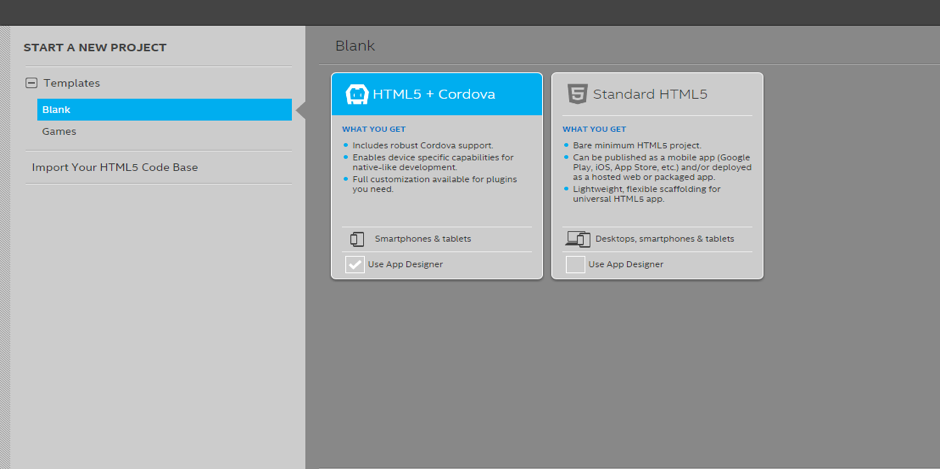
Buat proyek baru di Intel XDK, kemudian pilih template HTML5 + Cordova dan beri nama proyeknya “CekLokasi” dan tentukan lokasi penyimpanan proyeknya sesuai dengan preferensi kamu. Jangan lupa untuk mencentang boks “Start with App Designer” untuk mempermudah desain pembuatan aplikasi.
CekLokasi-1
Intel XDK akan secara otomatis membuat template koding untuk proyek aplikasinya agar kamu dapat langsung membuat aplikasi. Jika kamu sudah pernah membuat aplikasi HTML, pasti kamu akan merasa familiar dengan template koding yang dihasilkan karena Intel XDK memang menggunakan bahasa HTML5 untuk pembuatan aplikasinya.
Tahap pertama yang kamu lakukan adalah mengklik tab “Design” untuk memulai pembuatan tampilan aplikasi. Untuk sekarang kita cukup menggunakan tampilan yang sederhana saja. Ketika diminta untuk memilih framework tampilan aplikasi, pilih saja “jQuery Mobile“.
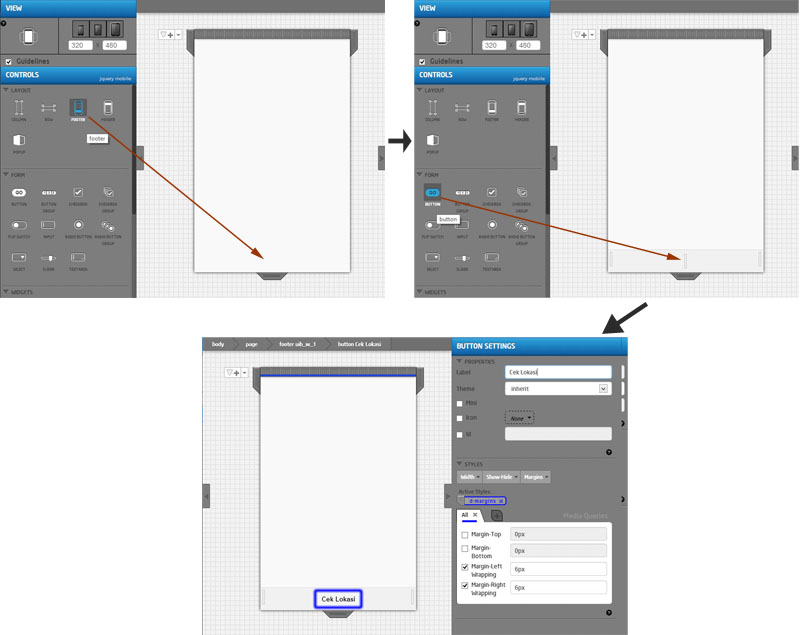
Seret komponen Footer di menu Layout ke tampilan aplikasi kamu. Selanjutnya Seret komponen “Button” ke “Footer” yang baru kamu buat dan setelah itu beri label “Cek Lokasi” di tombol yang kamu buat sebelumnya.
CekLokasi - 3a
Selesai :) Itu saja langkah-langkah untuk pembuatan tampilan aplikasi menggunakan App Designer di Intel XDK. Sekarang kita akan masuk ke tahap pengkodingan aplikasi kita.

Pengimplementasian GPS dan Google Maps

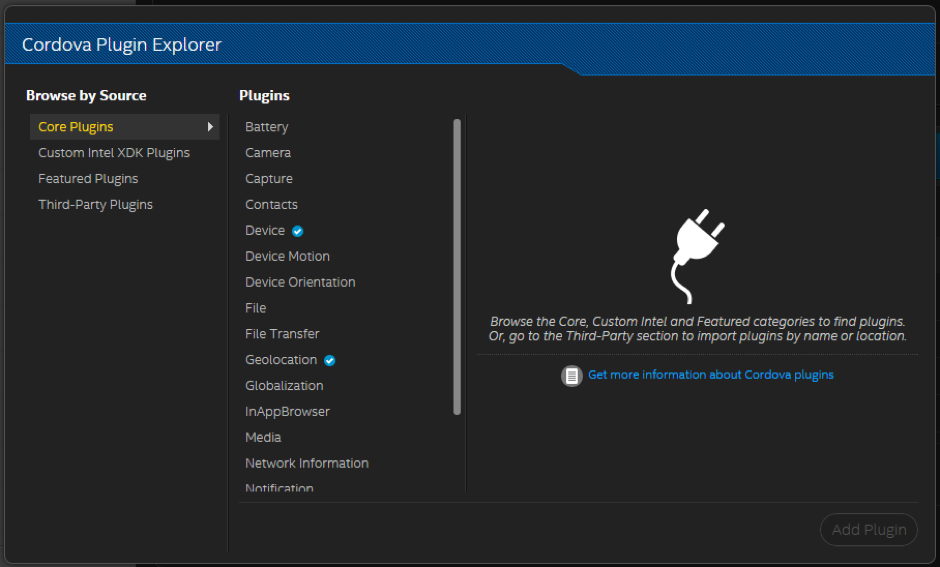
Pada Intel XDK versi terbaru ini, kita akan menggunakan plugin Geolocation yang tersedia untuk aplikasi kita. Caranya mudah, pilih menu Project yang ada dipojok kiri atas kemudian pilih Plugin Management, kemudian tambahkan plugin Geolocation dengan memilih padaCordova Plugin Explorer.
Jika kamu belum memiliki Google API Key, dapatkan dulu Google API Key agar kamu dapat menggunakan Google Maps API. Untuk cara mendapatkan Google API Key dapat mengunjungi situs Google Developers. Setelah kamu memiliki Google API Key, masukkan kodingan di bawah ini di bagian head di index.html proyek kamu:
CekLokasi-2
Ketiikan code sbb:
<!DOCTYPE html>
<html>

    <head>
        <meta charset="UTF-8">
        <link rel="stylesheet" type="text/css" href="jqm/jquery.mobile-min.css">
        <title>Blank App Designer Cordova Web App Project Template</title>
        <meta http-equiv="Content-type" content="text/html; charset=utf-8">
       <meta name="viewport" content="width=device-width, minimum-scale=1, initial-scale=1, user-scalable=no">
        <style>
            /* following three (cascaded) are equivalent to above three meta viewport statements */
            /* see http://www.quirksmode.org/blog/archives/2014/05/html5_dev_conf.html */
            /* see http://dev.w3.org/csswg/css-device-adapt/ */
                @-ms-viewport { width: 100vw ; min-zoom: 100% ; zoom: 100% ; }          @viewport { width: 100vw ; min-zoom: 100% zoom: 100% ; }
                @-ms-viewport { user-zoom: fixed ; min-zoom: 100% ; }                   @viewport { user-zoom: fixed ; min-zoom: 100% ; }
                /*@-ms-viewport { user-zoom: zoom ; min-zoom: 100% ; max-zoom: 200% ; }   @viewport { user-zoom: zoom ; min-zoom: 100% ; max-zoom: 200% ; }*/
        </style>

        <link rel="stylesheet" href="css/app.css">
        <link rel="stylesheet" type="text/css" href="css/index_main.less.css" class="main-less">
        <script src="cordova.js" id="xdkJScordova_"></script>
        <script src="js/app.js"></script>
        <script src="js/init-app.js"></script>
        <script src="xdk/init-dev.js"></script>
        <script type="application/javascript" src="lib/jquery.min.js"></script>
        <script type="application/javascript" src="jqm/jquery.mobile-min.js" data-ver="0"></script>
  <script src="https://maps.googleapis.com/maps/api/js?key=AIzaSyDO-TvTh1ayNlM2XiSyYcqhO81FxBDewJU&callback=initMap"></script>

  </head>
   
    <script>
        var CekLokasi = function() {
        document.addEventListener("deviceready", function(){
            navigator.geolocation.getCurrentPosition(function(position) {
            var mapProp = {
                center:new google.maps.LatLng(position.coords.latitude,position.coords.longitude),
                zoom:12,
                mapTypeId:google.maps.MapTypeId.ROADMAP};
            var map=new google.maps.Map(document.getElementById("map-canvas"),
                                        mapProp);
            var marker=new google.maps.Marker( {
                position:new google.maps.LatLng(position.coords.latitude,position.coords.longitude)});
            marker.setMap(map);
            },
                                                   
            function(error){
                if(error.code == PositionError.PERMISSION_DENIED)
                {
                    alert("App doesn't have permission to use GPS");
                }
                else if(error.code == PositionError.POSITION_UNAVAILABLE)
                {
                    alert("No GPS device found");
                }
                else if(error.code == PositionError.TIMEOUT)
                {
                    alert("Its taking too long find user location");
                }
                else
                {
                    alert("An unknown error occured");
                }
            }, { maximumAge: 3000, timeout: 5000, enableHighAccuracy: true });
        }, false);
        }
    </script>

    <body>
        <div class="upage" id="mainpage" data-role="page">
            <div class="upage-outer">
                <div class="upage-content ac0 content-area vertical-col left"></div>
                <div id="map-canvas" style="width:300px; height:300px;"></div>
                <div data-role="footer" data-position="fixed" class="container-group inner-element uib_w_1" data-uib="jquery_mobile/footer" data-ver="0">
                    <h1></h1>
                    <div class="widget-container wrapping-col single-centered"><a class="widget uib_w_2 d-margins" data-uib="jquery_mobile/button" data-ver="0" data-role="button" onclick="CekLokasi()">Cek Lokasi</a>
                    </div>
                    <div class="widget-container content-area horiz-area wrapping-col left"></div>
                    <div class="widget-container content-area horiz-area wrapping-col right"></div>
                </div>
            </div>
        </div>
    </body>

</html>